

The Art of Not Scanning Everything
This week, while the coffee is slow and the world is loud, I am quietly enjoying a ClickHouse charming Dictionary structure, watching a billion rows find their meaning in a fraction of a second.
A Dictionary is a key-value structure, stored in memory and used to accelerate queries, especially JOINs with lookups. Dictionaries are an ideal solution for storing frequently used dimension tables.
If you have a multi-node cluster, then the dictionary will be copied to each cluster node's memory.
Querying a Dictionary is extremely fast. It can be directly populated from many external or internal sources: S3 file, MySQL or Postgres table or HTTP endpoint, and refreshed on any predefined schedule.
CREATE [OR REPLACE] DICTIONARY [IF NOT EXISTS] [db.]dictionary_name [ON CLUSTER cluster]
(
    key1  type1  [DEFAULT | EXPRESSION expr1] [IS_OBJECT_ID],
    key2  type2  [DEFAULT | EXPRESSION expr2],
    attr1 type2  [DEFAULT | EXPRESSION expr3] [HIERARCHICAL|INJECTIVE],
    attr2 type2  [DEFAULT | EXPRESSION expr4] [HIERARCHICAL|INJECTIVE]
)
PRIMARY KEY key1, key2
SOURCE(SOURCE_NAME([param1 value1 ... paramN valueN]))
LAYOUT(LAYOUT_NAME([param_name param_value]))   -- controls how the Dictionary is stored in memory
LIFETIME({MIN min_val MAX max_val | max_val}) -- sets the predefined refresh interval
SETTINGS(setting_name = setting_value, setting_name = setting_value, ...)
COMMENT 'Comment'
More on syntax here.
You can have a composite primary key on as many keys as you want, but having a one-key index will allow you to use a super-fast memory layout.
When setting LIFETIME, always use a range, like LIFETIME(MIN 300 MAX 600). This ensures that if you have a cluster of 100 nodes, they won't all rush to the source database at the exact same second to refresh, potentially crashing your production DB in a fit of synchronised enthusiasm.
When a dictionary reloads, ClickHouse builds the entire new version in memory next to the old one before swapping. This means for a brief moment, you need double the RAM of the dictionary size!
Here is an example from Clickhouse academy, which didn't work for me, and I had to alter it a bit ( most probably because they are testing their code examples on Clickhouse Cloud, and I am using the cluster hosted in Kubernetes)
There is a file with mortgage rates, located on some HTTP endpoint. We want to use this data in our queries. First, I will try to read the data from a file using the URL- Table Function
SELECT *
FROM url('https://learnclickhouse.s3.us-east-2.amazonaws.com/datasets/mortgage_rates.csv')
LIMIT 10
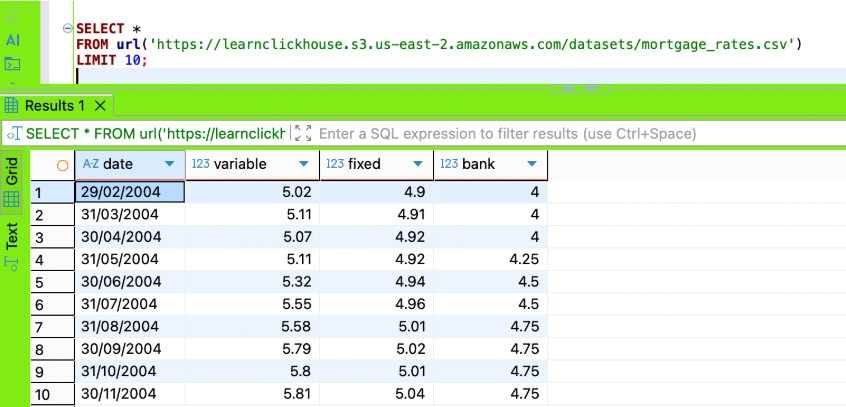
In the Clickhouse academy lab, I was supposed load it directly into the Dictionary; however, it didn't work for me, kept failing on date column parsing with the following error: “ Expected one of: list of pairs, list of elements, key-value pair, identifier. (SYNTAX_ERROR)”
CREATE DICTIONARY uk_mortgage_rates
(
  date DateTime,
  variable Decimal32(2),
  fixed Decimal32(2),
  bank Decimal32(2)
)
PRIMARY KEY date
SOURCE(url(
  'https://learnclickhouse.s3.us-east-2.amazonaws.com/datasets/mortgage_rates.csv'
))
LAYOUT(HASHED())
LIFETIME(3600);
The solution that worked for me was to add a view that transforms the data, then build a Dictionary with the view as a source. This is a great way to apply our business logic to the external file before we load its data into a Dictionary.
CREATE VIEW uk_mortgage_rates_view AS
SELECT
   parseDateTime(date, '%d/%m/%Y') AS date,
   variable,
   fixed,
   bank
FROM url('https://learnclickhouse.s3.us-east-2.amazonaws.com/datasets/mortgage_rates.csv');


CREATE DICTIONARY uk_mortgage_rates
(
   date DateTime,
   variable Decimal32(2),
   fixed Decimal32(2),
   bank Decimal32(2)
)
PRIMARY KEY date
SOURCE(CLICKHOUSE(TABLE 'uk_mortgage_rates_view' DB currentDatabase()))
LAYOUT(HASHED())
LIFETIME(3600);

Comments
No comments yet.
Leave a comment